Insights
■
How to Make AI Understand Your Brand Colors
Quick Answer: AI doesn’t understand hex codes as colors. It sees them as text strings. When given only #0066FF, AI generates flat, artificial results. When given semantic context (“Blue Ribbon,” usage, mood, accessibility ), AI generates authentic, textured results. Semantic color layers include hex code, name, usage rules, accessibility specs, and emotional associations making colors truly machine-readable.
How Does AI Think About Color Differently Than Humans?
Your brand’s primary color is a specific shade of blue, meticulously chosen and documented in your guidelines as hex code #0066FF. To a human designer, this is a precise instruction. To an AI image generator, it’s gibberish. When you ask it to create an image featuring your brand’s color, it produces a generic, often incorrect, shade of blue. This is a classic example of the AI Context Gap in action, and it reveals a fundamental truth about how AI understands color: it thinks in language, not in code.
But here’s what’s even more striking: the quality difference is not just about accuracy. It’s about depth, texture, and realism. When you provide an AI with only a hex code, it generates flat, artificial-looking colors that lack the natural variation and contextual richness of real-world materials. When you provide semantic context, the AI generates colors that feel authentic, grounded, and dimensionally accurate.
What Is the Visual Proof: Hex Code vs. Semantic Layer?
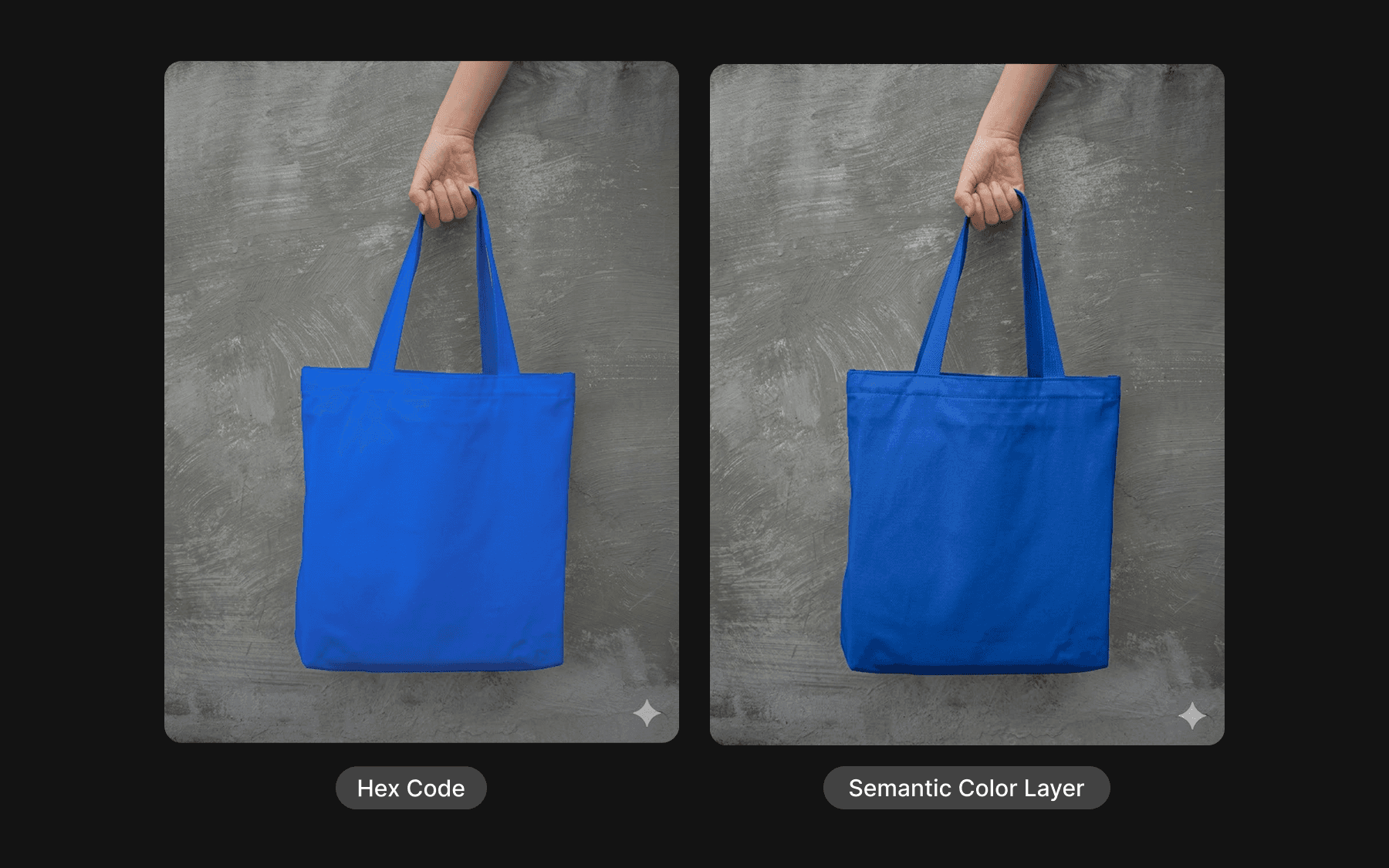
Look at these two images of a blue tote bag generated by the same AI model:
Left (Hex Code Only: #0066FF): The blue appears flat and plastic-like, with a uniform, artificial quality. The color lacks depth and doesn’t interact naturally with light and shadow. The fabric looks synthetic and disconnected from reality.
Right (Semantic Layer: “Blue Ribbon”): The blue has depth, texture, and natural variation. The color interacts realistically with light and shadow. The fabric looks like actual material with authentic properties. The overall image feels grounded and real.
The difference is not subtle. It is the difference between an artificial rendering and a photorealistic representation. And it all comes down to how the AI understands the color.
Why This Happens: Semantic Association vs. Mathematical Mapping
AI models don’t “see” hex codes as colors; they see them as strings of text. This fundamental mismatch creates two distinct problems:
The Semantic Association Advantage
When an AI model encounters the label “Blue Ribbon,” it can lean on millions of training examples where that name was associated with specific objects, moods, and descriptions. The model understands that “Blue Ribbon” is a vibrant, saturated blue because it has been described that way in thousands of design blogs, product catalogs, and creative briefs. The color comes with rich contextual baggage: it’s associated with trust, professionalism, fabric quality, and visual depth. The AI uses all of this context to generate an image where the blue looks authentic and dimensionally accurate.
The Mathematical Mapping Problem
To a model, #0066FF is just a sequence of characters. Unless the model has been specifically trained to map hexadecimal strings to a visual color space (which is becoming more common but isn’t universal), it has to “calculate” the color intensity. This process is fundamentally different from semantic understanding. The model treats the hex code as a mathematical instruction rather than a conceptual one. The result is a flat, pure color with no contextual richness. The blue appears as a mathematical value, not as a material or a concept.
The Tokenization Problem
Making this worse is how AI models break down text through a process called tokenization. A color label like “Crimson” is often a single token, making it easy for the model to process as a distinct concept. But a hex code like #f5c401 might be broken into multiple pieces (#f5, c4, 01). This forces the model to reconstruct the relationship between those fragments to understand the final color, which can lead to “hallucinated” or inaccurate shades. The model is essentially doing math on broken pieces, rather than accessing a learned concept.
How Do You Build the Color Semantic Layer?

To make your brand’s colors AI-fluent, you need to enrich your color tokens with a semantic layer of structured metadata. This layer transforms a simple hex code into a rich, machine-readable definition that captures not just what the color looks like, but what it means, where it should be used, how it should be applied, and what contextual richness it carries.
The semantic layer should include five key fields:
1. Name
A memorable, brand-specific name for the color. This is not a generic color name like “blue,” but a branded identifier that makes the color instantly recognizable within your organization and, more importantly, within the AI’s training data. This name becomes the primary way the color is referenced in conversations and systems.
Example: “Blue Ribbon”
2. Hex Code
The precise hex value for the color. This remains the source of truth for technical implementation in design files, code, and digital systems. But it is no longer the only way the AI understands the color.
Example: #0066FF
3. Usage
Explicit guidance on where and how the color should be applied. This field tells the AI (and human designers) the specific contexts and components where this color is appropriate. It prevents the color from being misapplied in contexts where it doesn’t belong.
Example: “Primary CTAs, headers, accent elements”
4. Accessibility
Documentation of the color’s accessibility characteristics, specifically its contrast ratio against common backgrounds. This ensures that AI-generated content meets accessibility standards without requiring manual review.
Example: “AAA contrast on white (contrast ratio: 8.59:1)”
5. Mood
The emotional and brand qualities that the color conveys. This is the semantic bridge between the visual and the conceptual. It tells the AI what feeling or brand attribute the color represents, allowing it to apply the color in contexts that align with that mood and to render the color with the appropriate depth and contextual richness.
Example: “Trust, professional, stability”
What Does the Complete Semantic Layer Look Like: From Concept to Code?
Here is how this semantic layer looks when structured as a complete, machine-readable object:
This JSON structure serves multiple purposes simultaneously:
For Humans: The clear, readable fields (name, usage, mood) provide intuitive guidance for designers and brand managers.
For Machines: The structured data, accessibility metrics, and AI guidance allow any AI tool to query the color system and apply colors with precision, contextual awareness, and visual authenticity.
For Systems: The multiple color format representations (hex, RGB, HSL) ensure compatibility across different tools and platforms.
Why Does Color Data Quality Matter?

The difference between a flat, mathematically-derived blue and a contextually-rich, semantically-understood blue is not just aesthetic. It is a fundamental context to quality gap. When your brand colors are rendered with semantic understanding, they look real. They interact with light and shadow naturally. They feel like materials, not mathematical values. They inspire confidence and authenticity.
This is why the semantic layer is not just a nice-to-have feature for AI-native brands. It is a critical investment in the perceived quality and authenticity of every piece of content your brand creates. A flat blue says “this was generated by a machine.” A rich, contextual blue says “this was created with intention and understanding.”
Free Tool: The ColorAI Translator

Building a complete semantic layer for all your brand colors is a strategic investment, but you don’t have to do it all at once. A practical first step is to use the ColorAI Translator - a free tool that converts your hex codes into a partial semantic layer, giving you immediate insights into how your colors translate into AI-comprehensible language.
The ColorAI Translator takes a hex code like #0066FF and automatically generates:
Descriptive names that capture the essence of the color
Nearest established color names that anchor the color to known concepts
Visual characteristics that describe the color’s perceptual qualities
Mood associations that connect the color to emotional and brand attributes
Usage recommendations based on the color’s characteristics
This gives you a starting point for building your semantic layer. You can then refine and customize these suggestions to match your specific brand context and requirements.
Try it now: ColorAI Translator
Start with your primary brand color. See how it translates into semantic language. Then use that translation as the foundation for building out your complete color semantic layer. This is the bridge between the old way of thinking about brand colors (hex codes) and the new way (semantic understanding).
From Data to Dialogue
By building this semantic layer, you are fundamentally changing how your brand communicates with AI. You are moving from a purely data-based instruction (a hex code) to a rich, contextual dialogue. You are not just telling the AI what color to use; you are telling it about the color where it belongs, what it means, how it should be applied, and what contextual richness it carries.
This approach is not about abandoning precision. You still need your hex codes for traditional design and development workflows. It is about adding a comprehensive, semantic layer that makes your brand accessible to a new class of creative tools. It is about building a brand system that speaks both languages: human and machine.
In the age of AI, the brands that achieve consistency will be the ones that invest in this semantic layer. They will be the ones that understand that a color is not just a hex code; it is a complete system of meaning, context, and application. They are the brands that will not just survive in the age of AI, but will thrive creating content that looks authentic, feels intentional, and reflects the true quality of their brand.
How to apply the same semantic thinking to voice and typography ->